Adobe Illustrator 2025 Quick Reference for Faster, More Confident Design
Essential instructions, tips, techniques, and shortcuts presented in a convenient 4-page laminated format.
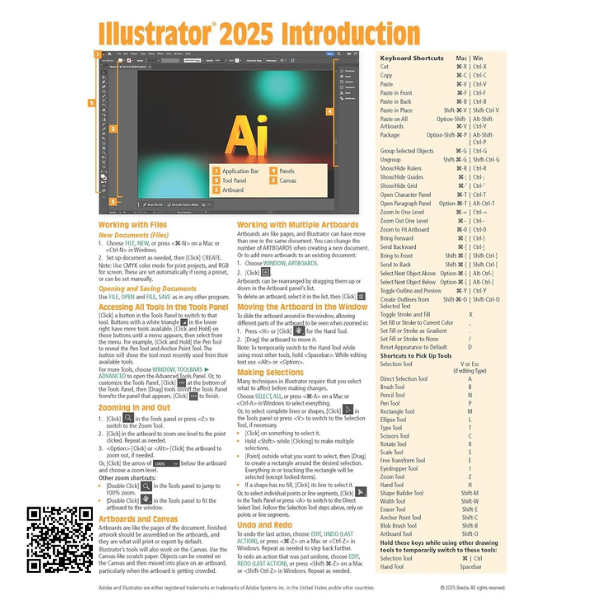
Keep essential Adobe Illustrator techniques close at hand with this 4-page laminated quick reference guide. Created as a convenient everyday reference, it provides step-by-step instructions and useful shortcuts for many of the tools and functions commonly used when creating and editing digital artwork.
Whether you are learning Illustrator for the first time, studying graphic design, working on creative projects, or simply need a fast reminder of a particular command, this guide makes it easier to find important information without having to search through lengthy manuals or online tutorials.
The compact laminated format makes it practical for keeping beside your computer, workstation, desk, or study area. It is designed for use with both Windows and Mac systems and covers a broad selection of Illustrator fundamentals and workflow techniques.
Working with Documents
Build confidence with the Illustrator workspace and essential document controls, including:
- Accessing tools from the Tools Panel
- Zooming in and out of artwork
- Understanding artboards and the canvas
- Working with multiple artboards
- Moving the artboard within the workspace
- Making selections
- Using Undo and Redo
Applying Color, Stroke & Fill
Learn the fundamentals of applying and managing color throughout your artwork:
- Applying color as a stroke or fill
- Selecting whether changes affect the stroke or fill
- Choosing colors through the Color Panel
- Working with Swatches
Editing Lines & Shapes
Understand practical techniques for modifying lines, shapes, and freehand artwork:
- Changing stroke weight and thickness
- Varying weights on a single stroke
- Changing the opacity of lines and shapes
- Copying color, stroke, opacity, and other properties between objects
- Applying brushes to lines
- Drawing freehand lines with the Paintbrush Tool
- Drawing and editing freehand artwork with the Pencil Tool
Creating & Editing Type
Work with text and typography using practical techniques such as:
- Creating type
- Adding text inside a shape
- Placing text along a line
- Converting type into shapes
Transformations & Layers
Improve your workflow by learning essential object and layer-management techniques:
- Moving lines, shapes, and text boxes
- Cutting lines
- Resizing objects
- Rotating artwork
- Reflecting and flipping objects
- Changing the stacking order
- Reordering objects through the Layers Panel
- Duplicating shapes, lines, and other objects
- Merging and cutting shapes with the Shape Builder Tool
Gradients & Finishing Touches
Create more polished artwork by working with Illustrator’s gradient tools:
- Creating linear gradients
- Creating radial gradients
- Using the Gradient Panel
- Using the Gradient Tool
Exporting & Printing
Prepare finished artwork for different formats and printing workflows:
- Using Outline View
- Exporting artwork to other file types
- Creating an Illustrator Package
- Preparing artwork for printing
- Setting a bleed for borderless printing
A Convenient Everyday Design Reference
From document setup and drawing tools to typography, color, layers, gradients, exporting, and printing, this compact laminated guide provides a useful reference for keeping important Illustrator techniques and instructions readily available while you work.